 Project Creation Wizard
Where
to find this?
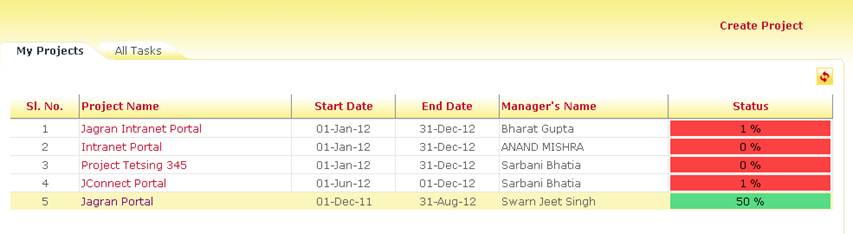
The project creation wizard is
located in the My Projects section on the top right corner.
Only higher management can have
access to this feature. To rest of the users, this button will not be visible.
How do I use this wizard?
Please click on the Create Project
option to start the wizard.

The first step is the details of the
new project to be formed
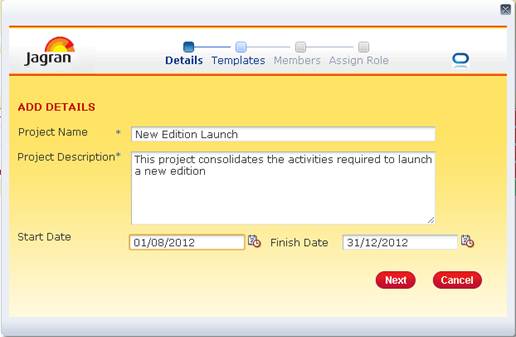
This includes, Project Name, Project
Description (this is reflected in the Project overview page description).
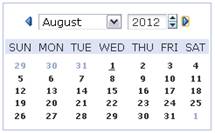
Project Creator should provide a tentative start date and end date.
Based on this date the project goal,
activities and task durations are bounded.
The next step is the Templates page.
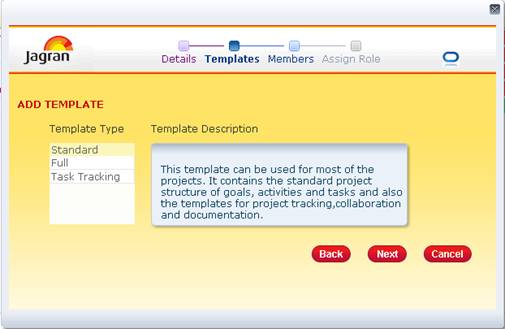
Templates are present in order to
pre-define the structure of the project. Selecting a template may pre create
the structure of goals activities and tasks. Document
folders, reports, tracking templates can be defined on this basis.
Templates may refer to real project
data such as a Sales Target Allocation, New edition launch, development of an
IT system etc. Similar kind of projects happening frequently in your
organization can be made into a template for reuse.
The name and brief description of
the template is provided on the screen.
Creation of new templates can be
done by the Jagran IT team based on the requirement.
After the selection of the template,
initial members can be added in the next step.
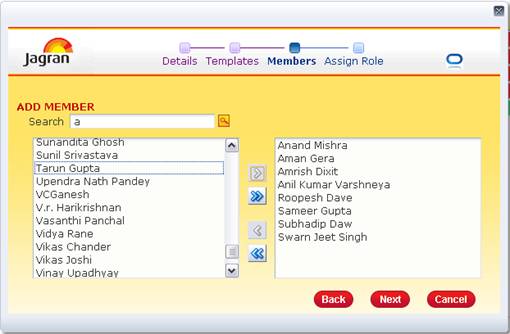
Members can be searched from the
search box and added in the side section. (Members can also be added later)
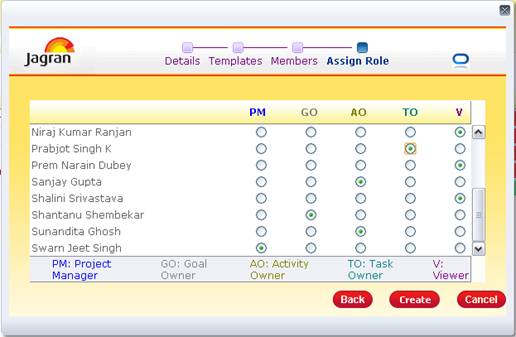
Once the members, are selected, the
roles must be given to these selections.
The roles are defined as follows:
·
Project Owner (Cannot be selected.
The user creating the project is by default the project owner)
·
Project Manager (Only one per
project): Supposed to design the structure of the project assign tasks and
track and maintain records and update events and announcements.
·
Viewer/Executive: This role is
assigned to users who are not an active part of the project but would have
access to all the data. Typically senior management should have this role
·
Goal owner: user responsible for
handling major goals of the project
·
Activity owner: User responsible for
handling activities under goals.
·
Task Owner: Users who are directly
working in the project and have actual tasks assigned under them.
Once these roles have been defined
for the users selected, press on the Create button for creating the project.
The new project will be present in
the My Project lists. If not displayed immediately, please press the refresh
button for updating the list of projects.